How to create a Random password generator(with GUI) application using python?
Random password generator using Python in simple explanation.

Introduction
While creating a new account on any platform it is important to set a strong password so that outsiders and hackers will not be able to guess your password. In this blog, we are going to see how to create a Random password generator using python
Code
Headers
from tkinter import *
from tkinter import messagebox
import re
import random
Tkinter is used for the GUI of the application re is used to check password strength random is used to generate random password
Setting up a title
root=Tk()
root.title("Random password generator")

root is the main window of the application
Password fields
top=Frame(root)

uc=Button(top,text="Upper Case",font=("Comic Sans MS", 15, "bold"),bg="green",command=lambda: change_mode("uc",uppercase))
lc=Button(top,text="Lower Case",font=("Comic Sans MS",15, "bold"),bg="red",command=lambda: change_mode("lc",lowercase))
num=Button(top,text="Numbers",font=("Comic Sans MS", 15, "bold"),bg="red",command=lambda: change_mode("num",number))
sym=Button(top,text="Symbols",font=("Comic Sans MS", 15, "bold"),bg="red",command=lambda: change_mode("sym",symbol))

uc.grid(row=0,column=0,padx=5)
lc.grid(row=0,column=1,padx=5)
num.grid(row=0,column=2,padx=5)
sym.grid(row=0,column=3,padx=5)

top.grid(row=0,column=0)

top(Frame):- It is the upper part of the application uc (Button):- It will turn on/off the Uppercase field lc (Button):- It will turn on/off the Lowercase field num (Button):- It will turn on/off the Numbers field sym (Button):- It will turn on/off the Symbols field
Getting password and displaying it
middle=Frame(root)
password_length=Scale(middle, from_=0, to=30,length=350,width=20, orient=HORIZONTAL)
password=Entry(middle,font=("Comic Sans MS", 20, "bold"))
generate=Button(middle,text="Generate",font=("Comic Sans MS", 13, "bold"),bg="green",command=generate_password)


password_length.grid(row=0,column=0,pady=20)
password.grid(row=1,column=0,padx=10)
generate.grid(row=1,column=1)

middle.grid(row=1,column=0,pady=5)
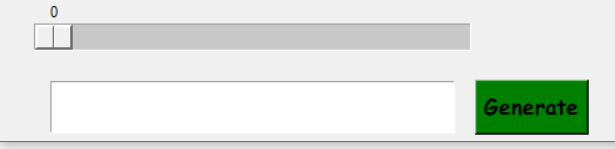 middle(Frame):- It is the lower part of the application
password_length(Scale) :- In which user can select password length
password(Entry):- In which password is going to be displayed
generate(Button):- It will invoke the generate_password function
middle(Frame):- It is the lower part of the application
password_length(Scale) :- In which user can select password length
password(Entry):- In which password is going to be displayed
generate(Button):- It will invoke the generate_password function
Functions
def generate_password():
    global uppercase,lowercase,number,symbol
    global password
    global password_length
    lowercase_ch="abcdefghijklmnopqrstuvwxyz"
    uppercase_ch="ABCDEFGHIJKLMNOPQRSTUVWXYZ"
    numbers="01234567890"
    symbols="!@#$%^&*()?{}[]+^;.,<>"

    if (lowercase or uppercase or number or symbol)==0:
        messagebox.showinfo("Password generator", "Select atleast one field")

    password_sample=""

    if uppercase:
        password_sample+=uppercase_ch
    if lowercase:
        password_sample+=lowercase_ch
    if number:
        password_sample+=numbers
    if symbol:
        password_sample+=symbols
    p =  "".join(random.sample(password_sample,int(password_length.get() )))
    if(len(p)>=8):
        if(bool(re.match('((?=.*\d)(?=.*[a-z])(?=.*[A-Z])(?=.*[!@#$%^&*]).{8,30})',p))==True):
            password.config(fg="green")
        elif(bool(re.match('((\d*)([a-z]*)([A-Z]*)([!@#$%^&*]*).{8,30})',p))==True):
            password.config(fg="red")
    else:
        password.config(fg="red")

    password.delete(0,END)
    password.insert(0,p)


def change_mode(what,color):
    global uc,lc,num,sym
    global uppercase,lowercase,number,symbol
    if what=="uc":
        if color:
            uc.config(bg="red")
            uppercase=0
        else:
            uc.config(bg="green")
            uppercase=1
    if what=="lc":
        if color:
            lc.config(bg="red")
            lowercase=0
        else:
            lc.config(bg="green")
            lowercase=1
    if what=="num":
        if color:
            num.config(bg="red")
            number=0
        else:
            num.config(bg="green")
            number=1

    if what=="sym":
        if color:
            sym.config(bg="red")
            symbol=0
        else:
            sym.config(bg="green")
            symbol=1
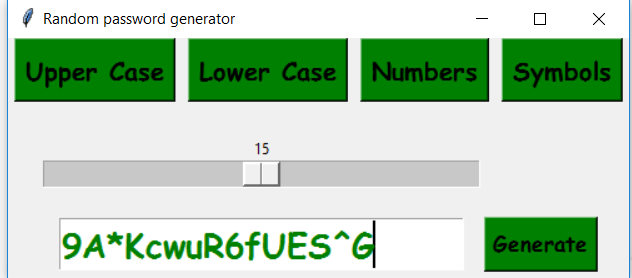
generate_password(function) will check which are fields checked by the user and based on the input length given by the user it will generate a password.
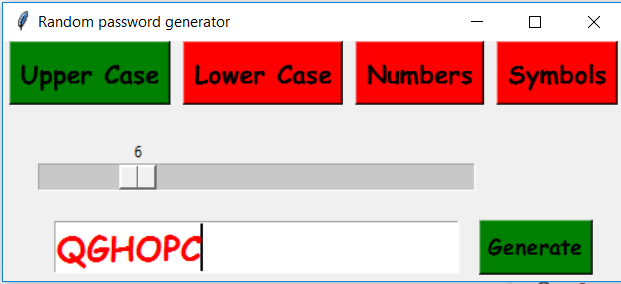
change_mode(function) will change the color of the button and set the field as 0/1 for example:- when lc(button) is clicked it will change green to red color and set lowercase(variable) to zero
Final code
from tkinter import *
from tkinter import messagebox
import re
import random


root=Tk()
root.title("Random password generator")

#global variables
uppercase=1
lowercase=0
number=0
symbol=0


#functions

def generate_password():
    global uppercase,lowercase,number,symbol
    global password
    global password_length
    lowercase_ch="abcdefghijklmnopqrstuvwxyz"
    uppercase_ch="ABCDEFGHIJKLMNOPQRSTUVWXYZ"
    numbers="01234567890"
    symbols="!@#$%^&*()?{}[]+^;.,<>"

    if (lowercase or uppercase or number or symbol)==0:
        messagebox.showinfo("Password generator", "Select atleast one field")

    password_sample=""

    if uppercase:
        password_sample+=uppercase_ch
    if lowercase:
        password_sample+=lowercase_ch
    if number:
        password_sample+=numbers
    if symbol:
        password_sample+=symbols
    p =  "".join(random.sample(password_sample,int(password_length.get() )))
    if(len(p)>=8):
        if(bool(re.match('((?=.*\d)(?=.*[a-z])(?=.*[A-Z])(?=.*[!@#$%^&*]).{8,30})',p))==True):
            password.config(fg="green")
        elif(bool(re.match('((\d*)([a-z]*)([A-Z]*)([!@#$%^&*]*).{8,30})',p))==True):
            password.config(fg="red")
    else:
        password.config(fg="red")

    password.delete(0,END)
    password.insert(0,p)


def change_mode(what,color):
    global uc,lc,num,sym
    global uppercase,lowercase,number,symbol
    if what=="uc":
        if color:
            uc.config(bg="red")
            uppercase=0
        else:
            uc.config(bg="green")
            uppercase=1
    if what=="lc":
        if color:
            lc.config(bg="red")
            lowercase=0
        else:
            lc.config(bg="green")
            lowercase=1
    if what=="num":
        if color:
            num.config(bg="red")
            number=0
        else:
            num.config(bg="green")
            number=1

    if what=="sym":
        if color:
            sym.config(bg="red")
            symbol=0
        else:
            sym.config(bg="green")
            symbol=1


top=Frame(root)

uc=Button(top,text="Upper Case",font=("Comic Sans MS", 15, "bold"),bg="green",command=lambda: change_mode("uc",uppercase))
lc=Button(top,text="Lower Case",font=("Comic Sans MS",15, "bold"),bg="red",command=lambda: change_mode("lc",lowercase))
num=Button(top,text="Numbers",font=("Comic Sans MS", 15, "bold"),bg="red",command=lambda: change_mode("num",number))
sym=Button(top,text="Symbols",font=("Comic Sans MS", 15, "bold"),bg="red",command=lambda: change_mode("sym",symbol))

uc.grid(row=0,column=0,padx=5)
lc.grid(row=0,column=1,padx=5)
num.grid(row=0,column=2,padx=5)
sym.grid(row=0,column=3,padx=5)

top.grid(row=0,column=0)


middle=Frame(root)
password_length=Scale(middle, from_=0, to=30,length=350,width=20, orient=HORIZONTAL)
password=Entry(middle,font=("Comic Sans MS", 20, "bold"))
generate=Button(middle,text="Generate",font=("Comic Sans MS", 13, "bold"),bg="green",command=generate_password)


password_length.grid(row=0,column=0,pady=20)
password.grid(row=1,column=0,padx=10)
generate.grid(row=1,column=1)

middle.grid(row=1,column=0,pady=5)


root.mainloop()
Strong password
Weak password
github code:-click here
About the author
I am a Engineer
Comments
Join the discussionNo comments yet. Be the first to comment.